
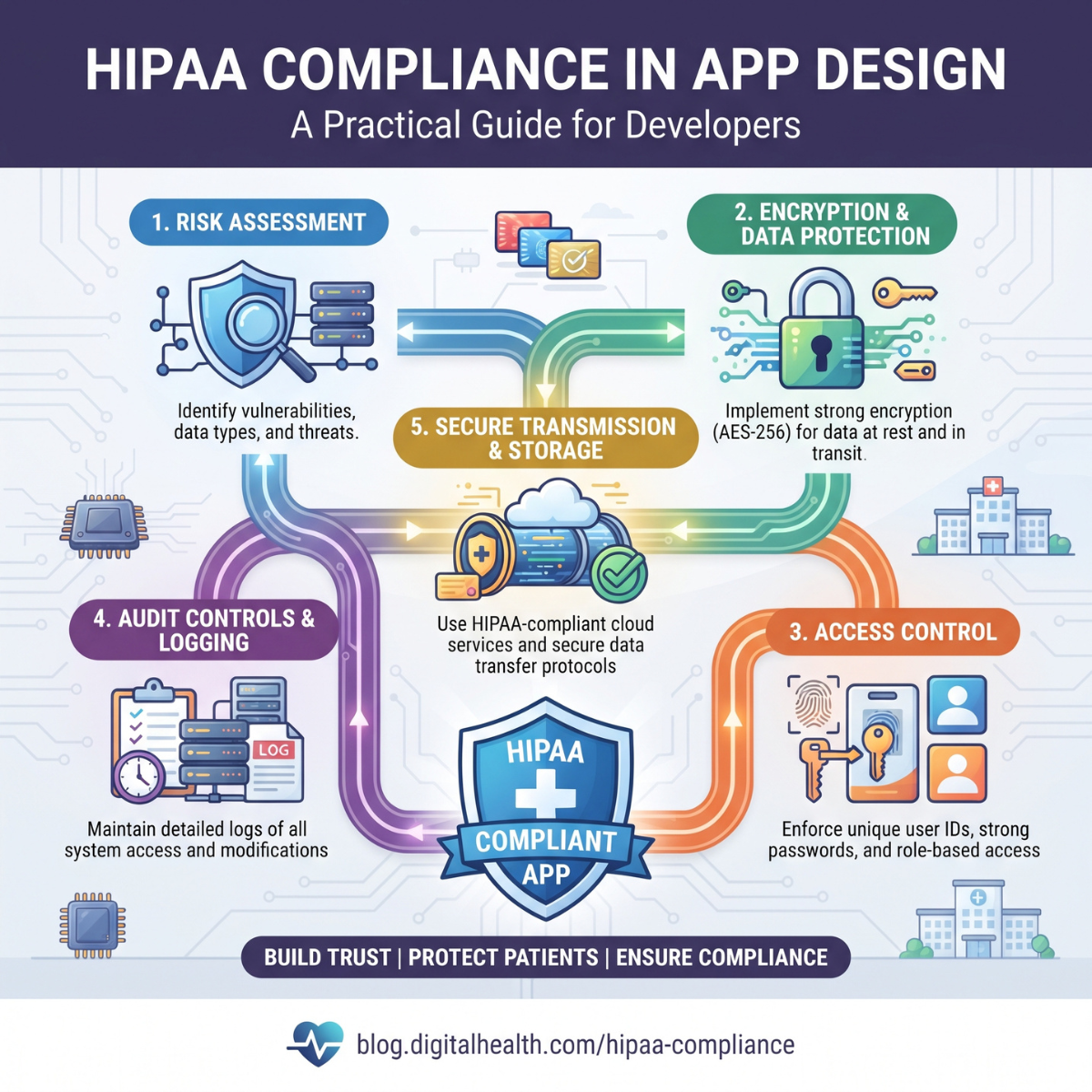
Healthcare applications are transforming how medical practices communicate with patients, manage appointments, deliver virtual consultations, maintain records, and process payments.
From patient portals and telehealth platforms to electronic health record systems and medical billing applications, digital healthcare technology is becoming an essential part of everyday operations.
But developing a healthcare app involves responsibilities that extend far beyond attractive interfaces and convenient features.
When an application handles protected health information, privacy and security become fundamental design considerations.
A patient may use an application to view test results, request prescriptions, schedule appointments, or communicate with a physician. That interaction may involve sensitive medical information, personal identifiers, treatment details, and insurance records.
If the application exposes this information to unauthorized users, the consequences can include privacy violations, operational disruption, regulatory investigations, and loss of patient trust.
This is why HIPAA compliance in app design is an important consideration for healthcare software developers, healthcare organizations, and technology vendors.
However, HIPAA does not apply automatically to every application that collects health-related information. Developers must first determine whether the application operates for a HIPAA-covered entity or business associate.
For regulated applications, HIPAA compliance requires an appropriate combination of technical security measures, administrative policies, contractual protections, and operational procedures.
This guide explores how to incorporate those requirements into the design and development of secure healthcare applications.
What Is HIPAA Compliance in App Design?
The Health Insurance Portability and Accountability Act (HIPAA) establishes a U.S. regulatory framework governing certain uses, disclosures, and safeguards for protected health information.
For healthcare applications subject to HIPAA, compliance means supporting the applicable requirements of the HIPAA Privacy Rule, Security Rule, and Breach Notification Rule.
The Privacy Rule establishes requirements concerning how protected health information may be used and disclosed and provides individuals with important rights over their information.
The Security Rule establishes safeguards for electronic protected health information, commonly called ePHI.
The Breach Notification Rule establishes notification responsibilities when certain breaches of unsecured protected health information occur.
In application design, these requirements influence how data is collected, displayed, transmitted, stored, accessed, retained, and protected.
HIPAA compliance is therefore not limited to the software interface.
It also involves the servers, databases, employees, service providers, operational processes, and security procedures supporting the application.
1. Determine Whether HIPAA Applies to Your Application
Before implementing HIPAA-specific controls, developers must determine whether their application is subject to HIPAA.
This is an essential first step because not every health or wellness application is regulated under HIPAA.
HIPAA generally applies to covered entities and their business associates.
Covered entities include health plans, healthcare clearinghouses, and healthcare providers that conduct certain standardized electronic transactions.
Business associates include organizations that create, receive, maintain, or transmit protected health information on behalf of covered entities while performing covered functions or services.
For example, a medical billing software company processing patient information for a physician practice may qualify as a business associate.
Similarly, a telehealth platform developed for a HIPAA-covered healthcare provider may fall within HIPAA requirements.
However, an independently operated consumer wellness app that collects fitness information directly from users may not be covered by HIPAA.
Other privacy, consumer protection, or health data laws may still apply.
Developers should review the application's business model, customer relationships, data sources, and intended purposes before making compliance decisions.
The fundamental question is not simply whether the application contains health information. It is whether the application operates within a relationship regulated by HIPAA.
2. Understand Protected Health Information
Protected health information, or PHI, generally refers to individually identifiable health information held or transmitted by a covered entity or business associate, subject to applicable exclusions.
Electronic PHI is the subset maintained or transmitted electronically.
Examples can include:
- Patient names connected with medical information
- Medical record numbers
- Diagnoses and treatment histories
- Prescription information
- Laboratory and diagnostic results
- Insurance information associated with healthcare
- Appointment information revealing healthcare services
- Identifiable billing and payment information
Developers should recognize that PHI is not limited to complete medical records.
An appointment record linking an identifiable patient to a particular healthcare service may also contain protected information.
Similarly, information transmitted through APIs, application logs, notifications, or third-party integrations may expose PHI.
The first practical step is creating a data inventory.
Identify what information the application collects, where it originates, how it moves through the system, who can access it, and where it is stored.
Without understanding the complete data lifecycle, security controls may protect the primary database while leaving information exposed elsewhere.
3. Apply Privacy by Design Principles
Privacy by design means considering information protection during application planning rather than adding privacy controls after development.
For healthcare applications, this approach helps reduce unnecessary data collection and inappropriate access.
Developers should evaluate each feature before implementation.
Does the application genuinely need the information being requested?
Which users require access?
Can the feature operate without displaying sensitive details?
Could an unauthorized person see information on a shared device?
For example, an appointment scheduling screen may not need to display a patient's entire medical history.
Similarly, a billing administrator may need insurance and payment information without requiring unrestricted access to clinical notes.
HIPAA's minimum necessary standard generally requires covered entities to make reasonable efforts to limit PHI use, disclosure, and requests to what is needed for the intended purpose, subject to important exceptions, including certain treatment-related disclosures.
Designing interfaces around appropriate information access supports this principle.
Privacy should influence product requirements, interface layouts, user permissions, and system architecture from the beginning.
4. Conduct a Security Risk Analysis
A security risk analysis is a central requirement of the HIPAA Security Rule for regulated entities.
It identifies potential threats and vulnerabilities affecting the confidentiality, integrity, and availability of electronic protected health information.
The analysis should consider how information is collected, stored, accessed, transmitted, and shared.
For an application, relevant risks may include unauthorized account access, insecure APIs, exposed databases, compromised employee credentials, lost devices, malicious software, and third-party security weaknesses.
A meaningful assessment should examine the actual application environment rather than rely exclusively on a generic checklist.
Risk analysis should inform security decisions throughout development.
For example, an application storing medical documents on mobile devices may require different safeguards from a browser-based system that retrieves records only when needed.
The U.S. Department of Health and Human Services provides risk analysis guidance, while NIST Special Publication 800-66 Revision 2 offers additional technical guidance for implementing the HIPAA Security Rule.
Risk assessments should also be reviewed when significant technology, infrastructure, or operational changes occur.
5. Build Secure User Authentication
Authentication establishes whether a person attempting to access the application is who they claim to be.
Healthcare applications should use authentication measures appropriate to the sensitivity of the information and assessed risks.
Useful controls include strong credential requirements, secure password storage, account recovery protection, login monitoring, and multifactor authentication.
Multifactor authentication adds another verification factor, reducing dependence on passwords alone.
For applications containing sensitive patient information, implementing MFA is a strong security practice.
Developers should also protect login endpoints against automated attacks and credential stuffing.
Password-reset workflows require particular attention because weak recovery procedures can undermine otherwise secure authentication.
Applications should not reveal unnecessary account information through error messages.
Instead of confirming whether a particular patient email address exists, the interface can provide a neutral response when a recovery request is submitted.
Authentication should balance usability with the level of protection required by the organization's risk assessment.
6. Implement Role-Based Access Control
Not every user should have access to every piece of patient information.
Role-based access control, or RBAC, allows applications to assign permissions according to defined responsibilities.
A healthcare application may include several user roles.
A physician may need access to clinical records relevant to authorized patient care.
A medical billing specialist may need access to insurance, coding, and payment information.
A receptionist may need scheduling and limited registration information.
A patient should have access to the information and services authorized for that individual.
Access control must be enforced at the application and server levels.
Hiding a button from an unauthorized user is not sufficient if the underlying API still allows access.
Developers should verify permissions during every protected request.
Organizations should also establish procedures for granting, reviewing, modifying, and revoking permissions.
An employee who changes responsibilities should not automatically retain unnecessary access from a previous position.
Strong access management reduces the risk of unauthorized disclosure and supports appropriate workforce access.
7. Protect Data With Encryption
Encryption is an important security control for healthcare applications.
It helps protect information from unauthorized disclosure if data is intercepted or storage systems are compromised.
Developers should evaluate encryption for information transmitted over networks and information stored in databases, backups, devices, and other systems.
Modern transport security, such as appropriately configured TLS, helps protect information while it moves between application components.
Strong encryption at rest can help protect stored patient information.
Encryption keys should be managed securely and kept separate from the data they protect where appropriate.
A critical regulatory distinction is that encryption is categorized as an addressable implementation specification under the currently effective HIPAA Security Rule.
Addressable does not mean optional.
Regulated organizations must assess whether encryption is reasonable and appropriate, implement it when appropriate, or document and implement an appropriate alternative where permitted.
From a practical application security perspective, strong encryption should normally be part of the design of systems handling sensitive patient information.
8. Design Secure Patient Dashboards
Patient dashboards are common in healthcare applications.
They may display appointments, medications, laboratory results, invoices, prescriptions, and communication history.
These features should be designed to prevent accidental information exposure.
A dashboard should retrieve records only after verifying that the authenticated user is authorized to access them.
Sensitive information should not be unnecessarily displayed before authentication.
Developers should also consider shared computers, unattended mobile devices, and screenshots.
For example, an application may display a limited appointment reminder rather than exposing detailed diagnoses on its initial notification screen.
Session expiration and reauthentication can provide additional protection for sensitive activities.
Designers should avoid placing confidential information in publicly accessible URLs or predictable record identifiers.
The interface should remain easy to navigate without weakening information security.
Good healthcare UX design combines accessibility, usability, and privacy.
9. Secure APIs and Third-Party Integrations
Modern healthcare applications commonly connect with electronic health record platforms, laboratory systems, billing software, pharmacies, and insurance services.
Application programming interfaces make these integrations possible.
However, poorly protected APIs can expose patient records even when the main application appears secure.
Developers should use strong authentication and authorization mechanisms for API access.
Every request should be checked for appropriate user or system permissions.
Input validation, request limits, secure token handling, and appropriate error responses can reduce common API security risks.
Developers should also prevent broken object-level authorization, where a user changes an identifier to access another patient's record.
Healthcare interoperability standards such as HL7 FHIR can support structured data exchange.
However, using FHIR or OAuth-based authorization does not automatically establish HIPAA compliance.
The entire integration must be evaluated for privacy, security, permitted disclosures, and applicable contractual requirements.
10. Maintain Appropriate Audit Logs
Audit controls help organizations record and examine activity in systems containing electronic protected health information.
The HIPAA Security Rule requires regulated entities to implement appropriate mechanisms for recording and examining system activity.
Healthcare applications should therefore maintain reliable audit capabilities.
Useful audit events may include:
- User authentication attempts
- Patient record access
- Record modification
- Data export
- Permission changes
- Administrative actions
- Suspicious access activity
- Security-related configuration changes
Audit records should contain enough information to support investigation without unnecessarily reproducing sensitive patient details.
Logs must also be protected against unauthorized access and alteration.
For example, an audit entry might record that an authorized employee viewed a particular record at a specified time.
It generally should not copy the patient's complete clinical history into the log.
Audit information should be reviewed through a documented monitoring process.
Simply collecting logs without examining meaningful security events provides limited value.
11. Protect Mobile Devices and Local Storage
Mobile healthcare apps face additional risks because devices can be lost, stolen, shared, or compromised.
Developers should carefully evaluate whether sensitive information needs to remain on the device.
Whenever practical, applications can reduce exposure by limiting persistent local storage.
If local storage is necessary, appropriate encryption, secure operating-system storage facilities, and access controls should be considered.
Authentication tokens should not be stored in insecure files.
Developers should also review risks associated with screenshots, clipboard access, background previews, debugging logs, and cached documents.
Push notifications deserve special attention.
A notification displaying a specific diagnosis or treatment may expose health information on a locked screen.
Neutral notification text, such as "You have a new message in your patient portal," may be a safer design choice.
Application security should also account for operating-system updates, lost-device scenarios, and device access policies.
12. Choose Appropriate Cloud Infrastructure
Healthcare applications frequently use cloud infrastructure for hosting, databases, file storage, backups, and application services.
Cloud computing can support scalability and availability, but it also creates contractual and security responsibilities.
HHS explains that a cloud service provider creating, receiving, maintaining, or transmitting ePHI on behalf of a covered entity or business associate generally acts as a business associate.
This can remain true even when the cloud provider only stores encrypted ePHI and does not possess the encryption key.
Where required, the organization must enter into a compliant business associate agreement with the cloud provider.
However, signing a BAA does not automatically make an application compliant.
Developers must still configure infrastructure securely, restrict access, manage encryption, protect backups, and assess risks.
Cloud services should be evaluated individually.
A vendor's general security reputation does not establish that every service it offers is appropriate for handling PHI.
13. Establish Business Associate Agreements
A Business Associate Agreement, commonly called a BAA, is an essential contractual protection in many HIPAA-regulated technology relationships.
It establishes responsibilities concerning the permitted use, disclosure, safeguarding, and handling of protected health information.
Healthcare application developers may need BAAs with covered-entity customers.
They may also need appropriate agreements with subcontractors that handle PHI on their behalf.
Relevant service providers can include cloud hosting vendors, data processing companies, technical support providers, and certain communication or analytics services.
The correct analysis depends on the services performed and the information involved.
HHS explains that merely enabling a patient to send their records to an independently selected third-party application does not automatically make that application a business associate.
Before selecting external services, developers should determine whether a business associate relationship exists and whether the vendor supports the necessary contractual requirements.
A signed agreement is one part of compliance, not a replacement for actual safeguards.
14. Avoid Unsafe Analytics and Tracking Tools
Analytics tools help application teams understand usage patterns and improve product performance.
However, third-party tracking technologies can create privacy risks when they receive sensitive information.
Healthcare apps may expose information through analytics events, tracking pixels, software development kits, session recordings, or diagnostic tools.
For example, an analytics event containing a patient's medical record identifier or appointment information may disclose protected information to an external vendor.
Developers should map what data each tracking technology collects and where it is transmitted.
Unnecessary PHI should not be included in analytics payloads.
Third-party analytics vendors should be assessed for applicable HIPAA requirements, permitted disclosures, and business associate obligations.
HHS has issued specific guidance about tracking technologies used by covered entities and business associates. A federal court also vacated a portion of that guidance relating to certain unauthenticated public webpages, so developers should use the current guidance rather than relying on oversimplified rules.
Privacy policies alone do not authorize otherwise impermissible disclosures of PHI.
15. Design Privacy-Conscious Notifications
Healthcare applications often use email, SMS, and push notifications for appointments, test results, messages, and payment reminders.
These features improve communication but can also expose sensitive information.
A notification should contain only the information appropriate for that communication channel and purpose.
For example, a mobile alert can tell a patient that a new test result is available without displaying the result itself on a locked screen.
Similarly, a billing notification can direct a patient to a secure portal rather than include unnecessary treatment information.
Developers should evaluate notification preferences, recipient verification, communication risks, and applicable consent or authorization requirements.
HIPAA does not impose a universal prohibition on email or text communication with patients.
However, regulated organizations must apply appropriate safeguards and account for the circumstances of the communication.
Notification design should therefore be based on a documented privacy and security assessment.
16. Support Patient Access and Privacy Rights
Healthcare applications should support the privacy rights that covered entities must provide under the HIPAA Privacy Rule.
These can include access to certain protected health information, requests for amendments, and other rights under applicable circumstances.
Patient portals can make access more convenient by allowing individuals to review records, download information, and communicate with healthcare providers.
Developers should design these features with secure identity verification and appropriate authorization controls.
Under the currently applicable HIPAA access rules, covered entities generally must act on access requests within 30 calendar days, with one permitted extension of up to 30 additional days when specific conditions are satisfied.
An application should support the organization's ability to fulfill these obligations.
Developers should also plan for data exports, identity verification, and appropriate handling of record requests.
A secure application should not make legitimate patient access unnecessarily difficult.
Privacy protection and patient access are both important design objectives.
17. Establish Secure Data Retention and Disposal
Healthcare apps should not retain information indefinitely without a legitimate operational, contractual, or legal reason.
Developers should establish retention and disposal processes based on applicable requirements.
HIPAA does not impose one universal six-year retention period for all patient medical records.
The Security Rule includes documentation retention requirements, while medical record retention periods may be governed by other federal or state requirements.
Applications should therefore support configurable retention schedules where appropriate.
Secure disposal may involve deletion, cryptographic erasure, media sanitization, or other suitable methods.
Backups and archived data must also be considered.
Deleting a record from the primary application interface does not necessarily remove it from every underlying system.
Retention and disposal procedures should be documented and coordinated with the organization's legal and operational requirements.
18. Build an Incident Response and Breach Notification Process
Even well-designed healthcare applications can experience security incidents.
A strong security program should prepare the organization to detect, contain, investigate, and respond to potential compromises.
Developers should implement useful security alerts, incident logging, access monitoring, and recovery capabilities.
An incident response plan should explain how suspicious activity is escalated, who investigates it, and how affected systems are protected.
Potential incidents include compromised credentials, unauthorized patient record access, ransomware, lost devices, and accidental disclosures.
Not every security incident constitutes a reportable HIPAA breach.
However, the HIPAA Breach Notification Rule establishes notification responsibilities when reportable breaches of unsecured PHI occur.
For covered entities, required individual notifications generally must be provided without unreasonable delay and no later than 60 days after breach discovery.
Business associates have separate notification obligations to the covered entity.
Applications should support rapid investigation by maintaining reliable records of system access, affected data, and relevant security events.
19. Test Application Security Before Launch
HIPAA compliance cannot be established by checking whether an application has a login page and encrypted database.
Development teams need a structured security testing process.
Testing should examine authentication, authorization, API access, session management, data storage, logging, and application configuration.
Useful practices include:
- Threat modeling
- Secure code review
- Dependency vulnerability scanning
- Static application security testing
- Dynamic application security testing
- API authorization testing
- Infrastructure configuration review
- Penetration testing
- Backup and recovery testing
Developers should also test whether users can access information belonging to another patient or organization.
For multi-tenant healthcare software, tenant isolation is especially important.
Testing should be performed before launch and repeated after significant changes.
Security findings should be tracked until appropriately addressed.
A successful functional test does not establish that an application is secure.
20. Avoid Common HIPAA Compliance Mistakes
Healthcare app development teams often misunderstand what makes a system compliant.
Some assume that encryption alone is sufficient.
Others believe that cloud hosting automatically provides HIPAA compliance.
Another common mistake is signing a BAA without examining vendor security capabilities.
Developers may also focus heavily on login protection while overlooking API permissions, analytics data exposure, backups, or employee access.
Common mistakes include:
- Collecting unnecessary patient information
- Using weak authentication
- Failing to enforce server-side authorization
- Storing sensitive information in application logs
- Exposing PHI through notifications
- Using unreviewed third-party SDKs
- Failing to conduct a risk analysis
- Leaving test environments unsecured
- Failing to monitor application activity
- Neglecting employee security training
A particularly misleading claim is that an application is officially "HIPAA certified."
HHS does not provide a general HIPAA certification that guarantees a product's compliance.
Independent assessments may provide useful evidence of security practices, but they do not replace regulatory compliance responsibilities.
21. A Practical HIPAA App Development Checklist
Before launching a healthcare application, development teams should review the following areas.
Regulatory Applicability
Determine whether the organization is a covered entity, business associate, or otherwise subject to relevant healthcare privacy laws.
Data Inventory
Document what sensitive information is collected, stored, transmitted, and disclosed.
Risk Analysis
Evaluate potential threats and implement appropriate safeguards.
Authentication
Protect account access and evaluate multifactor authentication.
Authorization
Enforce role-based permissions and verify access on the server.
Encryption
Assess and implement appropriate protections for stored and transmitted information.
Audit Logging
Record relevant system activity and establish monitoring procedures.
Cloud and Vendor Review
Evaluate service providers and execute required BAAs.
API Security
Protect integrations against unauthorized access and data exposure.
Mobile Security
Review device storage, session handling, notifications, and cached information.
Incident Response
Establish procedures for detecting, investigating, and responding to security events.
Security Testing
Review code, dependencies, infrastructure, APIs, and access controls before deployment.
This checklist is a planning tool rather than a complete legal compliance assessment.
22. Build a 90-Day HIPAA App Security Implementation Plan
Healthcare software teams can organize their initial compliance work through a structured implementation plan.
Days 1–30: Assess Requirements and Risks
Determine HIPAA applicability and identify relevant regulatory obligations.
Create an inventory of protected information and map data flows.
Identify vendors, cloud services, and external integrations.
Begin the required security risk analysis and document potential vulnerabilities.
Assign responsibility for privacy and security decisions.
Days 31–60: Implement Security Controls
Configure authentication and authorization systems.
Implement appropriate encryption, audit logging, session controls, and API protections.
Review cloud infrastructure and vendor agreements.
Develop policies for access management, data retention, incident response, and workforce security.
Test role permissions and data exposure risks.
Days 61–90: Validate and Improve
Perform security testing and review unresolved risks.
Evaluate backup and recovery procedures.
Confirm that required contractual protections are in place.
Train relevant employees.
Review audit logging and security monitoring capabilities.
Document decisions, remedial actions, and outstanding risks.
A 90-day plan can establish initial controls, but it does not guarantee HIPAA compliance or replace ongoing risk management.
The time and resources required depend on the application's complexity, data flows, and organizational responsibilities.
23. Why HIPAA Compliance Matters for Healthcare SaaS Platforms
Healthcare software-as-a-service platforms frequently support multiple providers, facilities, and clinical workflows.
These applications may manage appointments, patient communications, medical records, insurance information, or medical billing activity.
For SaaS providers, security failures may affect multiple customers.
Strong tenant separation, access controls, cloud security, and vendor oversight become especially important.
Healthcare organizations also expect software providers to demonstrate how their systems protect sensitive information.
Developers should be prepared to explain security responsibilities, relevant safeguards, access monitoring, incident handling, and contractual commitments.
A secure architecture can make applications easier to operate and evaluate.
However, compliance should not be presented as a marketing label unsupported by documented practices.
Healthcare clients need evidence that privacy and security responsibilities are being managed appropriately.
Frequently Asked Questions
Does every healthcare app need to comply with HIPAA?
No. HIPAA applicability depends on whether the application is operated by or on behalf of a covered entity or business associate and the relevant information-handling relationships.
Consumer health apps outside HIPAA may still be subject to other federal or state laws, including the FTC's Health Breach Notification Rule when applicable.
Is encryption enough to make an app HIPAA compliant?
No. Encryption is only one component of a broader security program that includes risk analysis, access controls, audit mechanisms, workforce procedures, vendor management, and incident response.
Is multifactor authentication mandatory under HIPAA?
The currently effective Security Rule does not impose a universal MFA requirement for every application login. Organizations must assess and implement safeguards appropriate to their risks and applicable requirements. MFA is a strongly recommended security control.
Does using HIPAA-ready cloud hosting guarantee compliance?
No. Appropriate cloud services and required BAAs are important, but the organization remains responsible for secure configuration, risk management, access controls, and other applicable obligations.
Can developers use third-party analytics in healthcare apps?
Potentially, but they must assess what information the tools collect, whether PHI is disclosed, whether the disclosure is permitted, and whether a business associate relationship or other safeguards are required.
Can an app be officially HIPAA certified?
HHS does not provide an official certification that guarantees a healthcare app's HIPAA compliance. Independent evaluations may support assurance efforts but do not replace ongoing compliance responsibilities.