
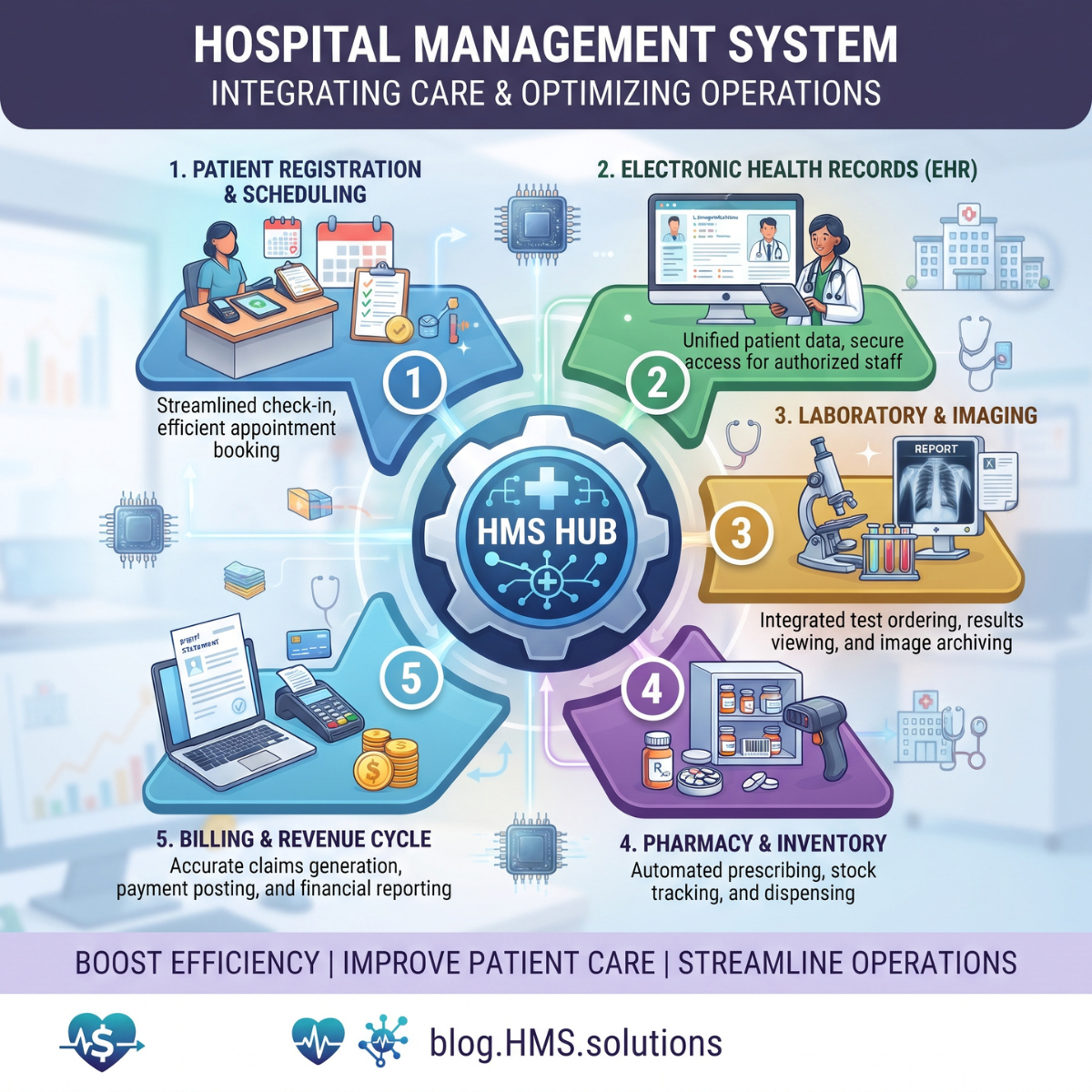
Modern hospitals are complex organizations. Every day, they coordinate appointments, patient admissions, clinical consultations, laboratory investigations, medications, surgeries, billing, insurance claims, inventory, staffing, and financial reporting.
Managing these activities through disconnected software, spreadsheets, and manual paperwork creates operational risks.
A patient's insurance details may be entered incorrectly. Laboratory results may be delayed because departments cannot exchange information efficiently. Hospital administrators may struggle to identify available beds, while billing teams may discover missing charges after discharge.
These problems can affect patient experience, staff productivity, clinical workflows, and financial performance.
A hospital management system (HMS) helps address these challenges by connecting hospital operations through a coordinated digital platform.
Depending on the software's capabilities, an HMS can support patient registration, appointments, admissions, electronic medical records, pharmacy operations, laboratory workflows, billing, inventory, and financial management.
However, hospital management software is not automatically a complete electronic health record system, nor does installing one guarantee regulatory compliance or improved reimbursement.
Successful implementation requires appropriate modules, clinical and administrative workflow design, secure integrations, staff training, and ongoing performance monitoring.
This guide explains what a hospital management system is, how it works, its essential features, implementation considerations, and the business value hospitals should measure.
What Is a Hospital Management System?
A hospital management system is a software platform designed to organize and coordinate the administrative, operational, and financial activities of a hospital.
Some products also include clinical documentation, electronic prescribing, laboratory management, and other patient care functions.
An HMS provides authorized staff with access to information relevant to their responsibilities.
For example, registration employees may manage patient demographic records while admission staff monitor bed availability.
Doctors may access clinical records through an integrated EHR, and billing teams may manage charges, claims, and payments.
Hospital administrators can use reporting dashboards to monitor operational and financial performance.
The primary objective is to reduce disconnected processes and improve the accuracy, availability, and usability of information across hospital departments.
The exact features differ significantly between vendors.
A small hospital may require a focused administrative and billing platform, while a large hospital network may need extensive clinical, operational, and enterprise integrations.
Hospital Management System vs HIS vs EHR vs ERP
These terms are related but should not be treated as identical.
| SystemPrimary purpose | |
| HMS — Hospital Management System | Coordinates hospital administrative, operational, and sometimes clinical workflows |
| HIS — Hospital Information System | Broad umbrella for hospital information systems, often including clinical and administrative applications |
| EHR — Electronic Health Record | Maintains electronic patient health information and supports clinical care workflows |
| EMR — Electronic Medical Record | Often refers to digital patient records within a particular care organization or practice |
| Hospital ERP | Manages enterprise functions such as purchasing, inventory, finance, HR, and supply-chain operations |
A vendor may market an integrated suite as both an HMS and HIS.
The meaningful distinction is not the product label but the functions actually supported.
For example, a hospital billing platform with an appointment calendar should not be assumed to provide a fully functional EHR, medication administration system, or clinical decision support.
Hospitals should evaluate specific modules, supported workflows, integrations, and certification status where relevant.
1. Patient Registration and Master Patient Index
Patient registration is one of the foundational HMS modules.
It records demographic information, contact details, relevant insurance information, and patient identifiers.
An effective system should help employees locate existing patients rather than create unnecessary duplicate records.
For example, a patient may visit the emergency department and later return for a specialist consultation.
Both encounters should be appropriately associated with the correct patient identity.
A Master Patient Index (MPI), or related identity management functionality, helps maintain consistent patient identification across connected systems.
Common features include patient search, duplicate detection, demographic updates, encounter creation, and identity verification support.
Poor patient identification can affect clinical information access, billing accuracy, and patient safety.
Therefore, hospitals should establish procedures for duplicate record review and safe record reconciliation.
2. Appointment Scheduling and Patient Access
Appointment management software organizes consultations, diagnostic procedures, follow-up visits, and other scheduled services.
The system may display provider availability, clinic locations, appointment types, and scheduled resources.
Digital scheduling can also support reminders, rescheduling, and patient communication preferences.
For example, a patient seeking a cardiology consultation can be assigned an available appointment while staff confirm the necessary referral and insurance information.
An effective scheduling module should connect with registration and relevant financial clearance workflows.
It should also support different appointment durations and resource requirements.
However, automated booking must account for clinical urgency and appropriate scheduling restrictions.
A well-designed system improves visibility into appointments without replacing clinical triage or professional scheduling judgment.
3. Admission, Discharge, and Transfer Management
Admission, discharge, and transfer management is particularly important for inpatient hospitals.
The ADT module maintains information about patient movements and encounter status.
For example, a patient may enter through the emergency department, receive an inpatient admission, move to another unit, and later be discharged.
The system should record these changes accurately.
ADT information can support bed management, clinical communication, billing, and operational reporting.
It is also commonly exchanged with connected systems through healthcare messaging interfaces.
Hospitals should ensure that patient movements are recorded promptly and that downstream systems receive the correct encounter updates.
Delayed or inaccurate ADT information can create confusion about patient locations and associated services.
4. Bed and Ward Management
Bed management helps hospitals monitor inpatient capacity and coordinate patient placement.
Useful features include bed status, ward assignment, room availability, cleaning status, and transfer requests.
For example, when a patient is discharged, the bed may need to be cleaned and prepared before another patient can be admitted.
A bed management dashboard can make this workflow more visible.
However, an empty bed is not automatically clinically suitable for every patient.
Placement decisions may depend on isolation requirements, staffing, clinical acuity, equipment, and department capabilities.
The software should support authorized staff in making these decisions rather than treating occupancy as the only consideration.
Relevant performance measures include occupancy, transfer delays, and time required to prepare beds for new patients.
5. Electronic Health Records and Clinical Documentation
Many hospital management platforms integrate with EHR systems.
An EHR supports clinical documentation and access to patient health information.
Depending on its capabilities, it may include progress notes, medical histories, allergies, medications, diagnoses, clinical orders, and discharge summaries.
For example, a physician treating an admitted patient may need access to previous laboratory results, current medication information, and relevant clinical notes.
The EHR component should preserve accurate information and support appropriate authorization.
Hospital administrators should distinguish an integrated EHR module from a basic patient history screen.
Clinical systems may require specialized functionality, interoperability capabilities, and applicable certification.
In the United States, organizations participating in certain federal programs may need certified electronic health record technology meeting relevant requirements.
6. Laboratory Information System Integration
Laboratory workflows involve test orders, specimen collection, processing, result verification, and communication with clinical teams.
A Laboratory Information System (LIS) manages laboratory-specific activities.
An HMS may integrate with the LIS to support ordering and result visibility.
For example, a physician orders a blood test through the clinical system.
The laboratory receives the order, processes the specimen, and makes verified results available to the authorized care team.
Accurate patient and specimen matching is essential.
The integration should distinguish preliminary, corrected, and final results where appropriate.
An HMS should not automatically present unverified laboratory information as final clinical findings.
Reliable laboratory integration reduces manual handoffs and can improve the timeliness of information exchange.
7. Radiology and Medical Imaging Management
Hospitals also need software that supports diagnostic imaging workflows.
A Radiology Information System (RIS) may manage imaging scheduling, orders, workflows, and reports.
A Picture Archiving and Communication System (PACS) stores and provides access to medical images.
DICOM is a major standard for exchanging medical imaging information.
An HMS may connect with RIS and PACS so authorized clinical users can access relevant imaging information.
For example, after a CT scan is performed and interpreted, the report may become available in the patient's clinical record.
The integration must preserve correct patient identification, examination details, and result status.
A hospital management system does not automatically replace diagnostic imaging infrastructure.
These integrations require compatibility testing and clinical workflow validation.
8. Pharmacy and Medication Management
Pharmacy management is another important hospital function.
Relevant software may support medication orders, inventory, dispensing workflows, purchasing, and medication availability.
For example, when a clinician orders a medication, the relevant pharmacy workflow may evaluate the order and prepare the medication according to established procedures.
The HMS can help connect medication-related operational information with billing and inventory systems.
However, medication ordering, clinical verification, dispensing, and administration are distinct activities.
A basic inventory module is not a substitute for clinical medication safety systems.
Hospitals should evaluate whether the software supports necessary pharmacy workflows, including appropriate authorization, medication records, and integration with clinical systems.
Medication safety and regulatory requirements must remain central to the design.
9. Operating Room and Procedure Scheduling
Operating room management software helps coordinate surgical schedules, staff, rooms, and required equipment.
Hospitals may use it to track planned procedures, room allocation, case status, and scheduling conflicts.
For example, a surgical team may need an operating room, specialized equipment, appropriate staff, and postoperative bed capacity.
Connected scheduling information can improve coordination.
However, resource availability does not establish clinical readiness.
A surgical case may still require consent, clinical review, authorization, or other prerequisites.
The system should therefore support safety checks and escalation workflows instead of automatically treating a scheduled procedure as cleared for performance.
Procedure completion status can also feed appropriate charge capture workflows.
10. Medical Billing and Revenue Cycle Management
Billing and revenue cycle management are among the most financially important HMS capabilities.
A hospital RCM module may connect patient access, charge capture, coding, claim preparation, insurance processing, payment posting, and financial account resolution.
Consider a patient admitted for a surgical procedure.
The hospital documents services, records relevant charges, assigns appropriate coding information, and prepares the insurance claim.
After submission, the billing team monitors processing, posts payments and adjustments, and addresses remaining balances.
In the United States, standard electronic institutional claims use the applicable ASC X12 837 transaction.
Other transactions support eligibility checks and electronic remittance processing.
A strong RCM integration should identify unresolved charges, claim rejections, payer denials, underpayments, and patient account issues.
However, a billing module cannot guarantee payment.
Reimbursement still depends on accurate documentation, applicable coding requirements, insurance benefits, contracts, and payer adjudication.
11. Patient Billing and Payment Management
Patient financial workflows extend beyond insurance claims.
Hospitals may need to generate statements, accept payments, manage appropriate installment arrangements, reconcile deposits, and process refunds.
A patient-facing portal can also provide access to bills, payment history, and billing support.
Statements should distinguish original charges, insurance payments, contractual adjustments, previous patient payments, and the remaining balance.
The system must verify patient responsibility before sending bills.
An insurance denial does not automatically mean the patient owes the entire charge.
Hospitals should also assess applicable financial assistance, balance billing, and price transparency requirements.
For U.S. hospitals, CMS maintains specific Hospital Price Transparency requirements, including public standard-charge disclosures.
These requirements are separate from ordinary patient account management and must be addressed through an appropriate compliance workflow.
12. Inventory, Procurement, and Supply-Chain Management
Hospitals purchase and consume significant quantities of medical supplies, pharmaceuticals, devices, and operational materials.
Inventory management modules help track stock levels, receiving, usage, transfers, and procurement.
For example, a hospital may need to monitor the availability of surgical supplies across multiple departments.
A connected system can identify low stock levels and support replenishment requests.
However, not all supplies require the same tracking logic.
Certain products may require lot numbers, serial numbers, expiration monitoring, or specialized storage controls.
The software should support relevant product requirements.
Inventory records should also connect appropriately with purchasing, accounting, and charge capture systems.
Poor inventory management can create unnecessary expenses, stock shortages, and incomplete financial information.
13. Staff, Department, and Administrative Management
Hospital operations depend on coordinated staffing and departmental responsibilities.
An HMS may include workforce scheduling, departmental assignments, user management, attendance, and administrative reporting.
For example, a hospital administrator may need to review staffing allocations across inpatient units.
However, scheduling software alone cannot determine safe staffing levels.
Clinical requirements, employee qualifications, labor rules, and organizational policies must inform staffing decisions.
The platform should also distinguish employment administration from application permissions.
An employee may be scheduled for a department without being authorized to access every patient's medical records.
Strong identity and access governance is essential when connecting workforce systems with clinical and financial applications.
14. Hospital Analytics and Management Dashboards
Hospital leadership needs reliable information to understand operational and financial performance.
A reporting module may combine information from admissions, beds, procedures, laboratory activity, billing, and inventory.
Useful dashboards can show occupancy trends, appointment utilization, discharge delays, claim denials, outstanding receivables, and financial results.
However, dashboards are only as accurate as the underlying information.
An incomplete charge capture process can distort financial reporting.
Delayed admission updates can produce inaccurate occupancy data.
Hospitals should establish consistent KPI definitions and data-quality controls before relying on dashboards for major management decisions.
Reporting should also respect patient privacy and appropriate workforce permissions.
How Does a Hospital Management System Work?
A hospital management system connects information across the patient journey.
Consider an illustrative inpatient encounter:
Registration → Admission → Clinical Assessment → Diagnostic Orders → Treatment → Charge Capture → Discharge → Insurance Billing → Payment and Account Resolution
The registration module creates or updates the patient's identity and encounter.
Admission staff assign the relevant inpatient location.
Clinical staff document treatment and order appropriate services.
Laboratory and imaging systems provide results to authorized clinicians.
The pharmacy and supply chain systems support medication and resource workflows.
As care is delivered, legitimate billable services are recorded.
The coding and billing teams prepare claims using appropriate documentation.
After payer adjudication, payments and adjustments are reconciled.
Hospital administrators use operational dashboards to evaluate performance.
The advantage comes from connected information and clearly defined responsibilities—not simply from placing every function inside one software product.
Benefits of a Hospital Management System
A well-implemented HMS can offer several operational advantages.
Improved coordination: Departments can access relevant information without relying entirely on manual calls, paper forms, or duplicate data entry.
Reduced administrative rework: Consistent records and integrations can reduce unnecessary corrections and repetitive entry.
Better operational visibility: Administrators can monitor appointments, admissions, beds, supplies, and financial workflows.
Stronger billing accuracy: Integration with clinical documentation and charge capture can help detect missing or inconsistent billing information.
Improved patient experience: Patient portals, appointment communication, and clearer financial information can reduce confusion.
More reliable reporting: Standardized data improves the ability to monitor performance and identify recurring problems.
These are potential benefits, not guaranteed financial outcomes.
Hospitals should evaluate actual improvement using baseline measurements and post-implementation results.
Key Technology and Integration Requirements
Hospital software must often communicate with systems supplied by different vendors.
Important interoperability technologies include:
HL7 FHIR: Supports standardized exchange of structured healthcare information through defined resources and APIs.
HL7 v2 messaging: Commonly used for operational and clinical interfaces, including admission, discharge, and transfer information.
DICOM: Supports medical imaging interoperability.
ASC X12: Supports standardized electronic administrative transactions such as claims, eligibility, and remittance advice in the United States.
A hospital may also need interfaces with existing EHRs, laboratory systems, pharmacy applications, accounting software, and payment platforms.
Successful integration depends on more than the presence of an API.
Developers must define data ownership, patient identifiers, message validation, error handling, synchronization, and monitoring.
An integration that sends data without confirming successful processing can create serious operational problems.
Hospital Management System Security and HIPAA
Hospital management systems frequently process electronic protected health information.
For U.S. HIPAA-covered hospitals and relevant business associates, the HIPAA Security Rule establishes administrative, physical, and technical safeguards.
A security program should address appropriate risk analysis, authentication, access controls, audit mechanisms, information protection, contingency planning, and workforce responsibilities.
Hospitals should also evaluate vendor relationships and required Business Associate Agreements.
A cloud provider or software vendor may support secure infrastructure, but a contract or encryption feature does not automatically establish HIPAA compliance.
Security testing should examine unauthorized patient access, privilege misuse, compromised accounts, and recovery from system outages.
HHS also publishes voluntary healthcare cybersecurity performance goals to support resilience.
For hospitals, system availability is not only an IT concern. Unavailable clinical systems can disrupt patient care and operational continuity.
Cloud-Based vs On-Premises Hospital Management Systems
Hospitals generally evaluate cloud-based, on-premises, and hybrid deployment models.
| DeploymentPotential advantageMain consideration | ||
| Cloud-based | Managed infrastructure and flexible scaling | Vendor contracts, configuration, connectivity, resilience |
| On-premises | Direct control over local infrastructure | Hardware, maintenance, staffing, disaster recovery |
| Hybrid | Flexibility across environments | Greater integration and operational complexity |
No deployment model is automatically more compliant or secure.
The right choice depends on the hospital's risk assessment, infrastructure, operational requirements, existing systems, and available technical resources.
Regardless of deployment, hospitals need backups, tested recovery procedures, secure identity management, and ongoing maintenance.
How Much Does a Hospital Management System Cost?
Hospital management system pricing depends on project scope.
A small hospital requiring scheduling, registration, and billing functionality has different needs from a multi-hospital network implementing clinical and enterprise systems.
Major cost drivers include:
- Number of hospitals, departments, users, and beds
- Required clinical and administrative modules
- Existing EHR and third-party integrations
- Custom software development or configuration
- Data migration and cleanup
- Cloud infrastructure or on-premises hardware
- Security and compliance engineering
- User training and workflow redesign
- Testing, implementation, and support
- Software licensing and ongoing maintenance
Hospitals should evaluate total cost of ownership rather than the initial license price alone.
A lower-cost platform may become expensive if extensive customization, interfaces, and manual workarounds are required.
A reliable estimate should come from a documented requirements assessment and itemized proposal.
How to Choose the Right Hospital Management Software
Selecting an HMS should begin with an operational requirements assessment.
Hospitals should identify existing systems, recurring process problems, critical patient safety workflows, and required integrations.
Important vendor evaluation criteria include:
Functional fit: Does the system support the hospital's actual clinical and administrative workflows?
Integration capabilities: Can it exchange information reliably with existing applications?
Security: Are access controls, auditability, backup procedures, and vendor responsibilities appropriate?
Clinical usability: Can clinicians complete common tasks accurately and efficiently?
RCM functionality: Does the software support charge capture, coding, claims, payment posting, and denial follow-up as needed?
Scalability: Can it accommodate additional departments, facilities, or services?
Support: What happens during outages, upgrades, and urgent incidents?
Commercial transparency: Are licensing, interfaces, migration, and ongoing costs clearly documented?
Where certified health IT is required, hospitals should verify the relevant product and version in the official Certified Health IT Product List.
A vendor's general claim of being certified is not enough to establish that every module meets a particular certification criterion.
Steps to Implement a Hospital Management System
Phase 1: Assess Existing Workflows
Map patient access, clinical documentation, diagnostics, pharmacy, admissions, billing, and administrative processes.
Identify data quality problems, duplicated work, and high-risk dependencies.
Phase 2: Define Requirements
Document essential modules, user roles, integration specifications, reporting needs, security requirements, and acceptance criteria.
Prioritize patient safety and business continuity.
Phase 3: Select or Develop the Software
Compare suitable vendors or evaluate custom development where necessary.
Review licensing, infrastructure, integration feasibility, support, and total ownership costs.
Phase 4: Prepare and Migrate Data
Clean and validate patient, provider, inventory, financial, and other relevant records.
Preserve appropriate relationships between patients, encounters, and source systems.
Phase 5: Integrate and Test
Test clinical, administrative, and financial workflows end to end.
Include patient identification, order handling, charge transfer, access controls, interface failures, and recovery procedures.
Phase 6: Train Staff and Launch in Stages
Train users by role.
Where practical, begin with controlled workflows or departments rather than changing every system simultaneously.
Maintain appropriate downtime procedures and escalation support.
Phase 7: Monitor and Improve
Review errors, staff feedback, patient safety concerns, system availability, and operational performance.
Address problems before expanding functionality.
Implementation requires sustained change management, not simply installing software and creating user accounts.
Hospital Management System KPIs
Hospitals should evaluate HMS effectiveness using meaningful performance indicators.
| KPIWhat it measures | |
| Registration error rate | Accuracy of patient access data |
| Appointment no-show rate | Scheduled visits not attended |
| Bed occupancy rate | Utilization of available inpatient capacity |
| Admission or transfer delays | Timeliness of patient movement |
| Laboratory turnaround time | Time from defined order or specimen milestones to results |
| Charge lag | Time between service and charge posting |
| Claim rejection rate | Claims failing defined submission checks |
| Initial denial rate | Defined unfavorable payer adjudication outcomes |
| Net days in A/R | Outstanding receivables relative to net patient service revenue |
| System availability | Time critical software remains operational |
| Inventory expiration or wastage | Unused or expired stock under a defined method |
Each KPI needs a clear definition, data source, baseline, and responsible owner.
A hospital should not claim that an HMS reduced denials simply because its claim volume changed.
Results should be evaluated using consistent comparisons and verified operational data.
Common Hospital Management System Implementation Mistakes
Several mistakes can undermine a new system.
Buying modules before mapping workflows: Leads to features that do not match clinical or administrative processes.
Ignoring data migration quality: Creates duplicate patients and unreliable records.
Weak integration testing: Allows information to be lost or mismatched between systems.
Underestimating staff training: Encourages workarounds and inconsistent system use.
Treating security as a final checklist: Leaves sensitive information and critical workflows exposed.
Overcustomizing the platform: Increases maintenance difficulty and upgrade costs.
Skipping downtime planning: Creates operational problems when systems become unavailable.
Measuring success only by launch completion: Overlooks whether the software improves actual performance.
Hospitals should address these risks through phased implementation, clinical involvement, acceptance testing, clear governance, and ongoing monitoring.
The Future of Hospital Management Systems
Hospital management software is evolving toward more connected and automated workflows.
Interoperability standards such as FHIR help support structured data exchange.
AI may assist with administrative document processing, demand forecasting, coding review, and identifying operational exceptions.
Patient portals can improve access to scheduling, records, and financial information.
Hospital dashboards may also support better visibility into capacity and resource utilization.
In the United States, ongoing interoperability developments and payer API requirements are influencing how healthcare applications exchange information.
For example, CMS has established API requirements for certain impacted payers with implementation dates generally beginning in 2027.
However, these requirements should not be inaccurately described as mandatory features of every HMS.
The most valuable future systems will combine reliable workflows, strong integration, usable interfaces, secure data handling, and measurable operational outcomes.
Frequently Asked Questions
What is a hospital management system?
A hospital management system is software that coordinates hospital administrative, operational, financial, and potentially clinical activities through connected applications or modules.
What are the main modules of hospital management software?
Common modules include patient registration, scheduling, admission and discharge, bed management, EHR integration, laboratory, radiology, pharmacy, inventory, medical billing, financial management, and reporting.
Is a hospital management system the same as an EHR?
No. An EHR focuses on electronic clinical records and care workflows, while an HMS typically covers a broader range of hospital administration and operations. Some platforms combine both.
Can an HMS improve hospital revenue cycle management?
Yes, when it connects clinical documentation, charge capture, billing, claims, and payment workflows appropriately. Improvements depend on implementation quality and operational controls.
Is cloud-based hospital management software HIPAA compliant?
Not automatically. Compliance depends on the organization's role, application architecture, safeguards, vendor agreements, configurations, and operational practices.
How long does hospital management system implementation take?
The timeframe depends on facility size, modules, integrations, data migration, testing, training, and regulatory requirements. Large enterprise deployments may require phased implementation over an extended period.
Should hospitals build custom HMS software or buy an existing product?
Existing products may be preferable when they satisfy the hospital's functional requirements. Custom development can be justified for specialized workflows or integration needs, but it introduces additional validation, maintenance, and support responsibilities.
Final Thoughts
A hospital management system can help conne