
Healthcare applications must do more than look professional and function smoothly. They also need to help users interact with sensitive medical information appropriately and securely.
A patient portal may display laboratory results, prescriptions, appointments, and medical bills. An electronic health record (EHR) system may give physicians access to clinical histories and treatment notes. A revenue cycle management (RCM) platform may contain diagnoses, insurance details, and patient payment information.
Each interface introduces potential privacy and security risks.
A poorly designed screen may display another patient's information. An unclear permission setting may expose sensitive records. A push notification may reveal medical details on a locked phone. An insecure download feature may allow protected information to reach an unauthorized recipient.
These are not simply visual design problems. They can become operational, security, and regulatory concerns.
This is why HIPAA-compliant UI/UX design principles matter when developing healthcare applications.
However, HIPAA does not prescribe a particular color scheme, button arrangement, or screen layout. Nor does an attractive interface establish compliance.
For applications subject to HIPAA, effective design must support applicable privacy and security requirements through carefully planned user journeys, access permissions, information displays, authentication flows, and system behavior.
This guide explains how healthcare product teams can integrate privacy-conscious and secure design into websites, mobile applications, clinical dashboards, patient portals, and medical billing software.
What Is HIPAA-Compliant UI/UX Design?
HIPAA-compliant UI/UX design refers to designing user interfaces and interactions that support an organization's applicable HIPAA obligations while making healthcare software useful and understandable.
UI, or user interface design, addresses what users see and interact with: forms, buttons, menus, dashboards, notifications, and visual layouts.
UX, or user experience design, addresses how users complete tasks, navigate workflows, understand information, and recover from errors.
In healthcare applications, both disciplines influence how protected health information is handled.
For example, a secure patient dashboard needs more than a password-protected login. It must also retrieve the correct patient's records, respect applicable access permissions, manage sessions appropriately, and reduce unintended disclosures.
The design team works with developers, security professionals, compliance personnel, and clinical stakeholders to support these outcomes.
HIPAA compliance ultimately depends on the complete regulated system, not the appearance of the interface.
1. Determine Whether HIPAA Applies to the Application
The first step is identifying the application's legal and operational context.
HIPAA generally applies to covered entities and business associates.
Covered entities include qualifying healthcare providers, health plans, and healthcare clearinghouses.
Business associates are organizations that perform certain functions or services involving protected health information on behalf of covered entities or other business associates.
For example, a software vendor that hosts patient records for a covered medical practice may be a business associate.
An independently operated consumer fitness app, however, may not be subject to HIPAA simply because it collects health-related information.
Other privacy and consumer protection laws may still apply.
Designers should therefore clarify the application owner's responsibilities before defining privacy and security requirements.
This determines which regulations, agreements, user rights, and organizational policies the interface must support.
2. Apply Privacy by Design From the Beginning
Privacy by design means incorporating appropriate information protection into product requirements, architecture, and workflows from the earliest stages of development.
It is more effective than attempting to correct privacy problems after the interface is completed.
Before designing a feature, ask:
- What information does this feature need?
- Why is the information necessary?
- Who is authorized to access it?
- Where will it appear?
- Can it be exposed through notifications or exports?
- Does it need to remain on the device?
- Which third parties receive the information?
Consider an appointment scheduling application.
It may need a patient's name, contact details, preferred appointment time, and relevant scheduling information.
It generally does not need to show the patient's entire medical history on the scheduling confirmation screen.
Designing for limited information exposure reduces opportunities for accidental disclosure.
The objective is to support useful healthcare interactions without exposing unnecessary sensitive data.
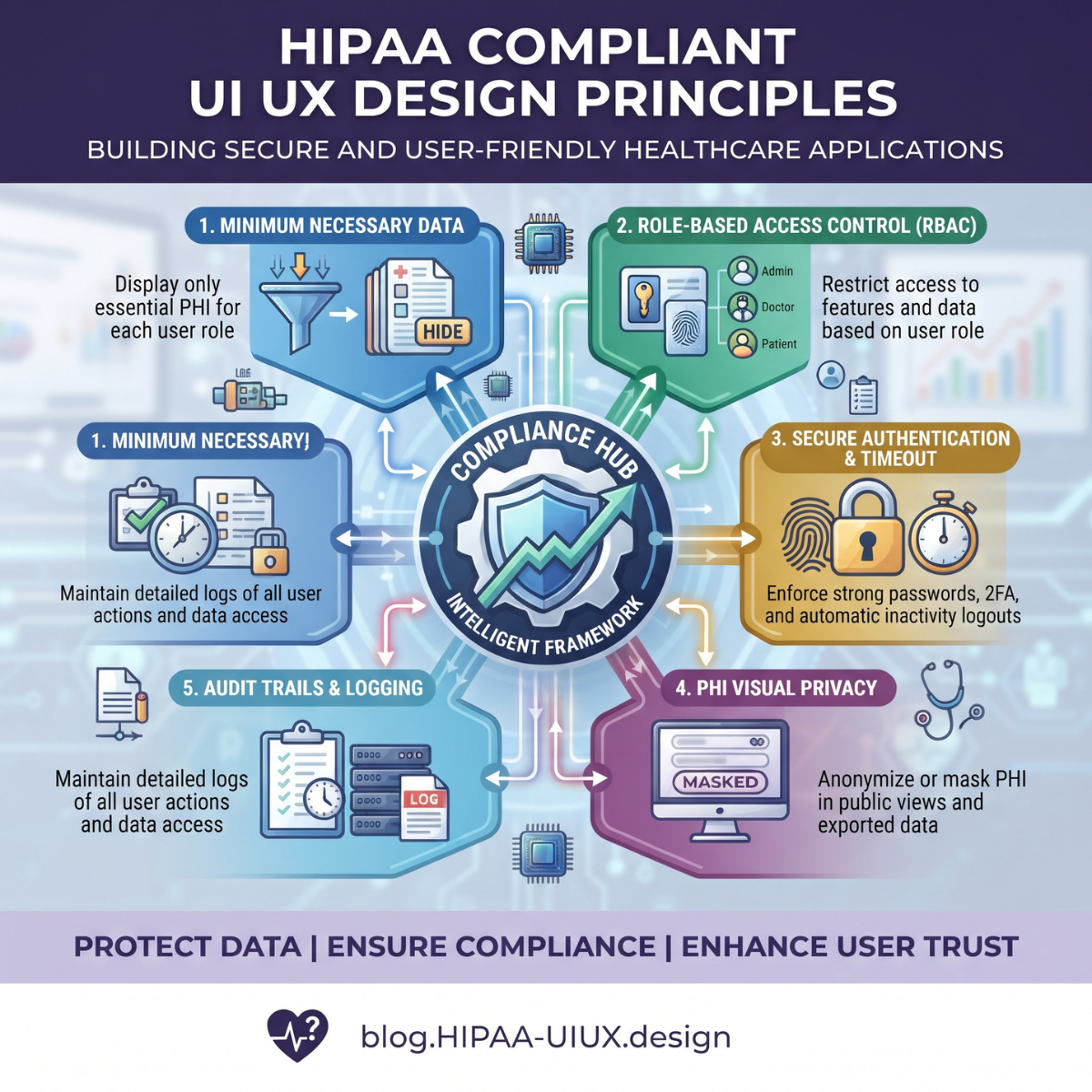
3. Understand the HIPAA Minimum Necessary Standard
The HIPAA Privacy Rule generally requires reasonable efforts to limit certain uses, disclosures, and requests for protected health information to the minimum necessary for the intended purpose.
This principle is relevant when designing workforce dashboards, administrative interfaces, and information-sharing features.
For example, an insurance billing specialist may need diagnosis codes, insurance details, and payment information.
That employee may not require unrestricted access to every psychotherapy-related record.
However, the minimum necessary standard has important exceptions, including disclosures to or requests by healthcare providers for treatment purposes and disclosures to the individual.
It should not be used to improperly restrict legitimate treatment access or patient rights.
Designers should work with compliance teams to translate approved access policies into interface behavior.
A useful design technique is to show the information needed for the user's primary task first, with additional authorized details available through intentional navigation.
4. Design Role-Based Access Controls
Healthcare applications often serve multiple user groups.
A physician, receptionist, billing specialist, administrator, and patient may all use the same platform for different purposes.
Role-based access control helps ensure that users can access only the functions and information they are authorized to use.
For example:
| User roleTypical interface needs | |
| Physician | Relevant clinical records, diagnoses, medications, and treatment documentation |
| Receptionist | Scheduling, registration, and appropriate demographic information |
| Billing specialist | Claims, coverage details, coding, payment information, and relevant documentation |
| Administrator | Authorized management settings, operational reporting, and user administration |
| Patient | Their own authorized records, appointments, messages, and financial information |
The interface should reflect these differences.
However, hiding a menu item is not adequate security.
The server must enforce authorization for every protected request.
Design permissions must match backend access controls.
Multi-tenant applications must also prevent users in one healthcare organization from accessing another organization's data.
5. Create Secure and Usable Login Experiences
Authentication is a foundational security function in healthcare applications.
An effective login experience must protect access without unnecessarily preventing legitimate users from completing important tasks.
Designers should support clear credential entry, secure account recovery, useful error messages, and appropriate additional verification.
Multifactor authentication is a strong security practice and should be evaluated based on risk and applicable requirements.
However, the currently effective HIPAA Security Rule does not impose one universal MFA method for every application login.
Designers should not create login flows that disclose whether a particular patient account exists to an unauthorized requester.
For example, a password recovery flow can provide a neutral confirmation that instructions will be sent if the account is eligible.
Secure design also includes protecting authentication tokens, managing failed login attempts, and ensuring that security controls are implemented beyond the visual interface.
6. Manage Sessions and Automatic Logoff
Healthcare applications are frequently used on shared workstations, tablets, and mobile devices.
A clinician may leave a workstation temporarily, or a patient may use a shared family computer.
An unattended authenticated session can expose sensitive information.
The HIPAA Security Rule includes automatic logoff as an addressable implementation specification.
This means regulated entities must evaluate whether it is reasonable and appropriate and implement it or an appropriate documented alternative where permitted.
Design teams should consider idle session timeouts, reauthentication for sensitive actions, and clear session-expiration messages.
For example, a patient portal may notify users that their session is about to expire.
If the session expires, the application should protect previously displayed information and require appropriate authentication before continuing.
For clinical environments, session controls must also consider patient safety and urgent access requirements.
The correct timeout policy should emerge from risk assessment and operational needs rather than arbitrary design preferences.
7. Make Patient Dashboards Privacy-Conscious
Patient dashboards often consolidate large amounts of sensitive information.
They may include:
- Upcoming appointments
- Laboratory results
- Medication lists
- Diagnoses
- Secure messages
- Insurance details
- Medical bills
- Clinical documents
The interface should present information clearly while avoiding unnecessary exposure.
For example, a patient dashboard might show that a new test result is available without displaying sensitive details on an unauthenticated screen.
Once the user is properly authenticated, the application can present information they are authorized to access.
Designers should also consider situations involving parents, caregivers, legal representatives, and delegated access.
These permissions can become complicated, particularly for minors or records subject to special confidentiality requirements.
The application should not assume that every family member is authorized to see every record.
Access policies must be implemented according to applicable law and organizational procedures.
8. Design Safe Notifications and Alerts
Notifications are useful for appointment reminders, laboratory results, prescriptions, and secure messages.
However, notifications can expose sensitive information before the intended recipient opens the application.
For example, a detailed medical notification may appear on a locked smartphone visible to coworkers or family members.
A safer default may be:
"You have a new message in your patient portal."
Rather than:
"Your treatment results for [specific condition] are available."
Designers should assess how much information appears in email previews, push notifications, text messages, and lock-screen alerts.
Users may also need appropriate communication preferences and confidential communication options.
HIPAA does not categorically prohibit email or text communication with patients.
Organizations must apply reasonable safeguards and respect applicable requirements concerning communication methods.
The objective is to offer useful notifications without unnecessary exposure.
9. Make Healthcare Forms Secure and Understandable
Healthcare forms collect some of the most sensitive information entered into digital applications.
These may include medical histories, insurance details, symptoms, medication information, and payment data.
Poor form design can cause both usability and privacy problems.
A long form may encourage users to enter unnecessary details.
An unclear validation message may display sensitive information.
A partially completed form may remain visible after the user leaves the device.
Good design practices include clear field labels, appropriate input validation, minimal necessary data collection, and understandable error messages.
Where draft saving is required, the system should protect stored data and clearly communicate whether information has been saved.
Designers should not use sensitive real patient information in prototypes or usability demonstrations without appropriate authorization and safeguards.
Synthetic data is generally preferable for design testing.
10. Support Clear Privacy Notices and Meaningful Choices
Healthcare applications should explain relevant information practices in clear language.
However, a privacy notice, general consent checkbox, and HIPAA authorization are not interchangeable.
Certain uses or disclosures of protected health information require a specific HIPAA-compliant authorization.
Others are permitted without authorization under applicable rules.
Designers should not assume that checking a generic "I agree" box permits unrestricted sharing.
If a particular workflow requires authorization, the interface should support the information and choices required by the applicable rule.
Product teams should avoid dark patterns such as confusing buttons, hidden privacy settings, or misleading language that pressures users into agreeing.
Privacy decisions should be understandable and accurately reflect the system's actual behavior.
Legal and compliance teams must determine when authorization is required.
UX designers should make those authorized workflows clear and usable.
11. Design Accessible Healthcare Experiences
Accessibility is essential in healthcare because applications serve people with different abilities, health conditions, ages, and levels of digital literacy.
Good accessibility practices include sufficient color contrast, clear typography, keyboard navigation, descriptive form labels, meaningful error messages, and support for assistive technologies.
Designers should avoid relying exclusively on color to communicate important information.
For example, a medication warning should not appear only as a red icon without supporting text.
WCAG provides widely used accessibility standards for digital interfaces.
Accessibility obligations can arise under laws such as the Americans with Disabilities Act, independently of HIPAA.
The Department of Justice's Title II web accessibility rule establishes WCAG 2.1 Level AA requirements for covered state and local government web content and mobile apps, subject to applicable terms and compliance dates.
Designing for accessibility supports patient access and reduces unnecessary barriers to healthcare information.
12. Protect Sensitive Information in Search and Navigation
Search functionality can expose protected information if results are not appropriately restricted.
For example, an internal EHR search tool should not display patient records beyond a user's authorized scope.
Search suggestions, recently viewed items, browser history, and autocomplete behavior also require review.
A patient identifier should not be placed in a publicly accessible URL or exposed through an insecure interface.
Designers should consider how information appears when users navigate backward, switch accounts, or open multiple tabs.
The interface should not show data from a previous authenticated session after logout.
Search and navigation features must work with backend authorization and secure data handling.
A visually clean search experience is not necessarily a secure one.
13. Make Data Sharing and Downloads Intentional
Patient portals may allow users to download clinical documents, share information with providers, or transmit records to applications they select.
These capabilities support important patient access rights.
However, sharing and exporting information can also create privacy risks.
Before a sensitive export, the interface may explain what information will be included and where it will be sent.
Appropriate safeguards should help prevent accidental recipient selection or unauthorized access.
The system should distinguish between organizational disclosures and patient-directed access requests.
HIPAA generally gives individuals rights to access protected health information in designated record sets, subject to applicable exceptions.
For records maintained electronically, individuals generally have rights to receive electronic copies when the relevant requirements are satisfied.
Designers should not use unnecessary security friction to obstruct legitimate patient access.
A secure design protects information while preserving the rights of authorized users.
14. Design Emergency Access Workflows Carefully
Clinical environments occasionally require urgent access to information.
For example, an authorized clinician may need relevant patient records during an emergency when ordinary access procedures are insufficient.
The HIPAA Security Rule requires emergency access procedures as part of its access control requirements.
It does not mandate a specific visual "break-glass" button.
Where an organization implements an emergency override, the interface should make the action intentional and traceable.
The workflow may include an explanation of the emergency access purpose, appropriate confirmation, and enhanced monitoring.
Emergency access should not become an unrestricted shortcut for routine activities.
Designers must also avoid excessive friction that delays necessary care.
These decisions require collaboration between clinicians, security teams, and compliance personnel.
15. Support Auditability Through Interface Design
The HIPAA Security Rule requires appropriate audit controls for systems containing electronic protected health information.
Audit mechanisms help organizations record and examine system activity.
UI/UX designers can support auditability by making important user actions distinct and understandable.
Examples include viewing sensitive records, changing permissions, exporting documents, modifying clinical information, or approving administrative actions.
The application should provide clear confirmations when users perform significant activities.
However, the actual audit records must be maintained by appropriately protected systems.
A visual activity history alone does not satisfy every audit control requirement.
Logs should capture relevant information without unnecessarily storing complete PHI within logging or analytics systems.
An effective design makes sensitive actions easier to understand, investigate, and manage.
16. Avoid Unsafe Third-Party Analytics and Tracking
Healthcare product teams commonly use analytics software, tracking pixels, session recordings, and user behavior tools to improve interfaces.
These technologies require careful evaluation.
A tracking tool may receive appointment information, search terms, patient identifiers, or other sensitive data.
HHS has issued guidance addressing tracking technologies used by HIPAA-covered entities and business associates.
A federal court vacated part of that guidance relating to certain visits to unauthenticated public webpages, so its application must be assessed with the current legal context in mind.
For authenticated patient portals, tracking technologies can create especially significant privacy concerns.
Design teams should avoid deploying third-party scripts or session recordings that capture PHI without a proper review of applicable permissions, safeguards, and vendor obligations.
Where possible, use aggregated, non-PHI product analytics.
A user experience improvement does not justify an impermissible disclosure of patient information.
17. Design for Mobile Device Privacy
Mobile healthcare applications create additional privacy challenges.
Devices can be lost, shared, stolen, or viewed in public places.
Designers should evaluate how information appears when an app is minimized, placed in the background, or reopened.
Potential controls include limited background previews, appropriate biometric reauthentication, secure storage, and protection of sensitive cached information.
Biometric authentication should rely on secure operating-system capabilities where appropriate.
It should not become an excuse to store sensitive biometric information unnecessarily.
Mobile interfaces should also clearly communicate when information is being uploaded, downloaded, or shared.
For healthcare applications, convenient access must be balanced against realistic device and account security risks.
18. Build Clear Error and Recovery Experiences
Error messages are an overlooked part of secure healthcare UX.
Poorly designed errors can expose information or encourage unsafe behavior.
For example, a detailed technical error may reveal patient identifiers or internal system information.
A generic failure message without useful guidance, however, may cause users to retry sensitive actions repeatedly.
Effective error design provides meaningful next steps without disclosing unnecessary details.
When a session expires, users should know how to sign in again.
When a document fails to upload, the interface should clearly explain the status.
When a payment is interrupted, the system should avoid creating uncertainty about whether the transaction was processed.
Error states should be tested for both usability and information security.
19. Apply HIPAA-Aware Design to Medical Billing and RCM Software
Revenue cycle management platforms frequently contain protected health information alongside insurance and financial data.
A billing dashboard may show patient names, diagnosis codes, procedure descriptions, claim statuses, and payment balances.
Designers should restrict access according to approved workforce permissions and operational needs.
For example, a payment posting specialist may need remittance details and relevant claim information without unrestricted access to unrelated clinical documentation.
An RCM system should also avoid revealing patient diagnoses in unnecessary notification previews or exported reports.
Bulk download functionality deserves particular attention because large exports can expose many records at once.
Useful controls include appropriate authorization, deliberate export actions, and auditability.
Healthcare financial software should be designed for accurate work while reducing unnecessary exposure of sensitive information.
20. Design Secure Telehealth Experiences
Telehealth interfaces combine communication technology with clinical information.
Patients may share symptoms, medical histories, images, and other sensitive details during virtual consultations.
Design teams should make it clear when a video session begins, whether participants are connected, and whether recording is enabled.
Recording controls and related permissions must reflect applicable law and organizational policies.
The interface should not automatically assume that every telehealth interaction can be recorded or shared.
Waiting rooms, meeting links, participant identification, and session termination also require appropriate safeguards.
For example, a patient should not accidentally join another patient's consultation because of a predictable meeting identifier or incorrect access control.
The interface should make secure participation straightforward.
21. Distinguish HIPAA Requirements From UX Best Practices
Not every recommended healthcare design practice is explicitly required by HIPAA.
This distinction prevents misleading compliance claims.
| Design practiceRegulatory relationship | |
| Access controls and user authentication | HIPAA Security Rule technical safeguard standards |
| Audit controls | HIPAA Security Rule requirement |
| Automatic logoff | Addressable Security Rule implementation specification |
| Encryption | Addressable specifications under the currently effective Security Rule |
| Role-based information access | Supports applicable Privacy Rule and Security Rule obligations |
| Neutral lock-screen notifications | Risk-reduction design practice supporting privacy safeguards |
| MFA | Strong security practice; evaluate applicable requirements and risk |
| WCAG accessibility | Accessibility best practice and potentially required under separate laws |
| Clear privacy settings | UX practice supporting transparency and applicable privacy obligations |
| Patient document downloads | May support HIPAA access rights and interoperability obligations |
Healthcare applications should not claim to be HIPAA compliant merely because their screens follow a design checklist.
Compliance requires appropriate organizational policies, technical implementation, agreements, risk management, and operational oversight.
22. How to Test HIPAA-Aware UI/UX Designs
Usability testing should include privacy and security scenarios, not just navigation and visual appearance.
Test whether unauthorized users can access records through direct links or search results.
Check what appears after logout, session expiration, account switching, and browser navigation.
Review how sensitive information appears in mobile notifications and background previews.
Test whether delegated users can access only the records they are permitted to see.
Examine patient downloads and information-sharing flows.
Use synthetic or appropriately protected test data.
Accessibility testing should include keyboard navigation, screen readers, zoom, color contrast, and error recovery.
Security engineers should separately verify server-side authorization, data protection, and system logging.
A successful usability test does not replace security testing or legal compliance review.
23. Common HIPAA UI/UX Design Mistakes
Several design mistakes can increase privacy exposure.
Displaying too much patient information: Reveals sensitive data beyond what is needed for the task.
Relying on hidden buttons for security: Fails to enforce server-side authorization.
Exposing diagnoses in notifications: Allows sensitive details to appear on locked screens.
Using generic consent for every disclosure: Confuses privacy notices, consent, and legal authorization.
Ignoring patient access rights: Creates unnecessary barriers to obtaining records.
Using unreviewed analytics tools: May transmit PHI to external parties.
Poor session management: Leaves confidential information visible on unattended devices.
Inaccessible interface controls: Makes healthcare technology harder to use for people with disabilities.
Using real patient data in mockups: Creates avoidable privacy risks during design and testing.
Promising HIPAA certification through interface design: Misrepresents the scope of regulatory compliance.
Avoiding these problems requires coordination between design, engineering, security, clinical operations, and compliance teams.
24. A Practical HIPAA UI/UX Design Checklist
Before releasing a healthcare application, review whether the design:
- Reflects the correct legal and operational context.
- Limits unnecessary PHI collection and display.
- Supports approved user permissions.
- Provides understandable authentication and recovery.
- Handles session expiration appropriately.
- Protects notification previews.
- Provides clear privacy and communication choices.
- Supports legitimate patient access.
- Protects document sharing and downloads.
- Accounts for caregiver and proxy permissions.
- Supports appropriate emergency access procedures.
- Makes sensitive actions auditable.
- Avoids unnecessary PHI exposure to third parties.
- Provides accessible navigation and forms.
- Handles errors without disclosing sensitive information.
- Has been reviewed using realistic privacy and security scenarios.
This checklist supports product planning but does not constitute a complete HIPAA compliance assessment.
25. A 30-Day Healthcare UI/UX Improvement Roadmap
Week 1: Audit Existing User Journeys
Review login, patient dashboards, clinical records, notifications, forms, exports, and account settings.
Identify sensitive data displays and risky interactions.
Document user roles and information access needs.
Week 2: Redesign High-Risk Interactions
Improve authentication flows, session messaging, permissions visibility, and notification privacy.
Reduce unnecessary sensitive information.
Clarify document-sharing and export actions.
Week 3: Prototype and Test
Create revised interfaces using synthetic data.
Test common clinical, administrative, and patient scenarios.
Evaluate accessibility and usability.
Have engineering and security teams assess the technical implications of the design.
Week 4: Validate and Prioritize Implementation
Review findings with healthcare stakeholders and compliance professionals.
Document required changes, owners, and priorities.
Test implemented controls where development is complete.
Establish a backlog for remaining security and usability improvements.
A 30-day assessment can identify and prioritize issues, but full remediation and compliance validation may require substantially more time.
Frequently Asked Questions
What is HIPAA-compliant UI/UX design?
It is the design of healthcare interfaces and workflows that support applicable HIPAA privacy and security obligations, including appropriate information access, protected interactions, and responsible handling of patient data.
Does HIPAA require a specific healthcare app design?
No. HIPAA does not prescribe a specific screen layout, color scheme, or visual design system. It establishes privacy and security requirements for regulated entities.
Is multifactor authentication mandatory for every healthcare application?
The currently effective HIPAA Security Rule does not impose a universal MFA requirement for every login. Organizations should assess applicable requirements and implement appropriate safeguards based on risk.
Can a healthcare app display patient diagnoses in notifications?
Such disclosures require careful evaluation. Neutral notification previews are often safer because detailed medical information may be visible to unintended recipients.
Is accessibility part of HIPAA compliance?
Accessibility is an important healthcare design requirement, but WCAG conformance is not itself a universal HIPAA Security Rule requirement. Separate accessibility laws may apply.
Can a UI/UX design agency guarantee HIPAA compliance?
No. A design agency can create interfaces that support HIPAA requirements, but compliance depends on the complete application, organizational practices, security safeguards, and applicable legal obligations.
Final Thoughts
HIPAA-compliant UI/UX design principles help healthcare organizations create applications that balance usability, patient privacy, and operational security.
Effective healthcare design begins with understanding which information needs protection, who should have access, and how users interact with sensitive data.
It continues through authentication, role-based permissions, patient dashboards, notifications, forms, information sharing, session controls, and accessibility.
However, security cannot be achieved through interface appearance alone.
A visually restricted feature must be backed by real access controls. A secure login must be supported by appropriate session management. A clear consent screen must reflect the actual legal and data-sharing requirements.
For healthcare organizations, the strongest approach is collaboration between UI/UX designers, developers, clinical stakeholders, cybersecurity professionals, and compliance teams.
The goal is not to make healthcare applications difficult to use in the name of security. It is to make legitimate access straightforward while reducing unauthorized access and unnecessary exposure of patient information.
When privacy and usability are considered together, healthcare software can support safer workflows, clearer communication, and greater confidence in digital healthcare services.